What Vercel actually costs at three sizes
Vercel's pricing page has more than thirty line items. Seats, CDN requests, Fast Data Transfer, Fast Origin Transfer, Active CPU, Provisioned Memory, ISR reads and writes, image transformations, Blob operations, four sizes of build machine, drains, tracing spans. It looks like a utility bill for a small town. The good news is that a typical small project only moves about five of those meters. The rest sit at zero.
So rather than walk through the page from top to bottom, I've turned it into three monthly bills for three made-up but realistic workloads. All prices below come from Vercel's pricing page and docs as I read them on 14 November 2026. They are US "starting at" rates; Vercel prices data transfer and compute by region, so your numbers will move a bit. Nothing here was deployed or measured. The workloads are assumptions, and I say what each one is so you can swap in your own.
The plans, in one table
Vercel has three plans. Hobby is free, Pro is a $20 platform fee plus usage, and Enterprise is a sales conversation.
| Hobby | Pro | Enterprise | |
|---|---|---|---|
| Base price | $0 | $20/month platform fee | Custom |
| Deploying seats | 1 | 1 included, then $20/month each | Custom |
| Viewer seats | Not available | Unlimited, free | Custom |
| Usage | Hard caps, can't buy more | $20 monthly credit, then on-demand | Custom |
| Commercial use | Not allowed | Allowed | Allowed |
Here is what Hobby includes each month, from the Hobby plan docs: 1M CDN requests, 100 GB Fast Data Transfer, 10 GB Fast Origin Transfer, 1M function invocations, 4 hours of Active CPU, 360 GB-hours of Provisioned Memory, and 5,000 image transformations. If you go over, there's no overage bill. In most cases you wait until 30 days have passed before you can use that feature again.
Pro works differently. According to the Pro plan docs, the $20 platform fee includes one deploying seat and $20 of usage credit that applies "from the first unit you use". The credit doesn't roll over. Pro also includes the lowest Flat Rate CDN tier, which covers CDN requests and Fast Data Transfer. The docs size that tier at 1M CDN requests and 1 TB a month. The pricing page's table says 10M requests. I couldn't reconcile the two, so the bills below use the docs' 1M figure, which is the more cautious reading. Check your own billing page.
These are the Pro on-demand rates that matter for most apps:
| Meter | Rate |
|---|---|
| Function invocations | $0.60 per 1M |
| Active CPU | $0.128 per hour |
| Provisioned Memory | $0.0106 per GB-hour |
| Fast Origin Transfer (CDN ↔ functions) | $0.06 per GB |
| Fast Data Transfer, if not on Flat Rate CDN | $0.15 per GB |
| CDN requests, if not on Flat Rate CDN | $2 per 1M |
| Image transformations | $0.05 per 1,000 |
Flat Rate CDN's paid tiers are $20/month (10M requests, 50 TB), $100/month (50M) and $300/month (150M).
The commercial-use rule
This is the line people skim past. Vercel's terms say: "You shall only use the Services under a Hobby plan for your personal or non-commercial use." Vercel's own guide on paused deployments gives the working definition: any deployment "used for financial gain". Its examples are taking payments from visitors, advertising a product or running ads such as AdSense, being paid to build or host the site, and sites built mainly around affiliate links. If a client pays you to build their site, Hobby is out, however small the traffic.
Bill one: the hobby site
Workload: a personal blog or portfolio, mostly static, with about 30,000 page views a month. Assume around 25 requests and about 2 MB per page view.
Here's the math. 30,000 × 25 = 750,000 CDN requests, which is under the 1M cap. 30,000 × 2 MB = 60 GB of transfer, under 100 GB. There are almost no function invocations.
| Line | Usage | Cost |
|---|---|---|
| Hobby plan | under every cap | $0 |
That's the whole bill, and it's a good deal. Two things change it. If the blog grows past a cap, it pauses rather than charging you, which is a fine failure mode for a personal site. If you add AdSense or start selling a course from the sidebar, the site becomes commercial and needs Pro. Then the bill is $20, and at this traffic the included credit goes almost entirely unused.
Bill two: the small SaaS
Workload: a Next.js app with three developers. It gets about 200,000 page views a month, which works out to roughly 4M CDN requests and 400 GB of transfer. It makes 3M function invocations. Each one averages 50 ms of Active CPU and returns about 20 KB. Add about 250 GB-hours of provisioned memory and 3,000 image transformations.
| Line | Working | Cost |
|---|---|---|
| Platform fee (incl. 1 seat + $20 credit) | $20.00 | |
| 2 extra developer seats | 2 × $20 | $40.00 |
| Function invocations | 3M × $0.60/M | $1.80 |
| Active CPU | 41.7 h × $0.128 | $5.33 |
| Provisioned Memory | 250 GB-h × $0.0106 | $2.65 |
| Fast Origin Transfer | 60 GB × $0.06 | $3.60 |
| Image transformations | 3,000 × $0.05/1K | $0.15 |
| Usage subtotal | $13.53 | |
| Less monthly credit | covers all of it | −$13.53 |
| Flat Rate CDN | 4M requests is above the 1M tier, so the $20 tier | $20.00 |
| Total | $80.00 |
If the pricing page's 10M figure turns out to be right, the CDN line drops to zero and the bill is $60.
The thing to notice is that seats are the biggest line, not usage. The $20 credit absorbed every compute meter at this size. A three-person team pays $60 before a single request arrives. Viewer seats are free, so your designer and PM can look at previews without adding to it.
Bill three: launch week
Workload: the same SaaS has a good launch. For one week traffic runs at about ten times normal, so the month ends at roughly 14M CDN requests, 1.6 TB of transfer and 12M invocations.
| Line | Working | Cost |
|---|---|---|
| Platform fee + 2 seats | $60.00 | |
| Function invocations | 12M × $0.60/M | $7.20 |
| Active CPU | 166.7 h × $0.128 | $21.33 |
| Provisioned Memory | 1,000 GB-h × $0.0106 | $10.60 |
| Fast Origin Transfer | 240 GB × $0.06 | $14.40 |
| Image transformations | 10,000 × $0.05/1K | $0.50 |
| Usage subtotal | $54.03 | |
| Less monthly credit | −$20.00 | |
| Flat Rate CDN | current tier for this cycle | $20.00 |
| Total | ≈ $114 |
Compute grew fourfold and so did the compute lines. The CDN line didn't move. That's the point of Flat Rate CDN: Vercel's docs say that if a month's usage exceeds your tier, Vercel "moves you to a higher tier at the start of the next cycle", and "a one-day spike doesn't trigger an upgrade". Two caveats follow from that:
- Next month can cost more. At 14M requests you'd start next month on the $100 tier unless you change it back. Tier changes take effect at the next billing cycle, so this is a calendar reminder, not an emergency.
- If Flat Rate CDN is off, the spike is billed per unit. That means 1.6 TB × $0.15 = $240 plus 14M × $2/M = $28, which takes the month to about $362. Make sure the toggle is on before your launch, not after.
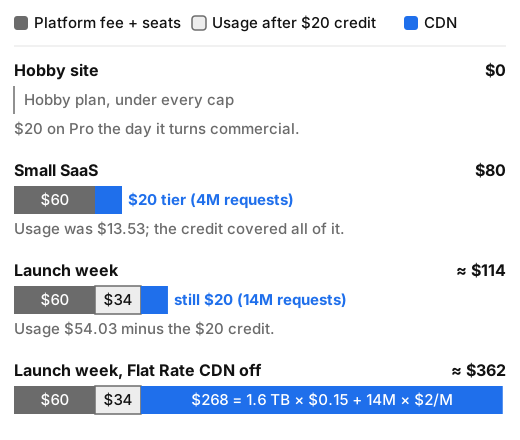 The CDN segment (blue) stays at $20 from 4M to 14M requests while compute grows. Switch Flat Rate CDN off and the same launch month adds $268 of per-unit CDN charges.
Vercel turns on a spend notification at $200 per cycle by default for new teams, and you can set it to pause projects automatically when you hit a hard limit. Who gets paged? With that set up, a budget email does, and nobody's phone rings at 3am over a broken box.
Same app, other platforms
Here is bill two's workload (4M requests, 400 GB, 3M invocations, three developers) priced on three alternatives on the same day. These figures are rougher than the ones above, because the platforms don't measure the same things.
| Platform | How it's priced | Estimated monthly bill |
|---|---|---|
| Vercel Pro | $20 platform + $20/extra seat, credit, Flat Rate CDN | $60–80 |
| Netlify Pro | $20/month, unlimited members, 3,000 credits. Bandwidth is 20 credits/GB, so 400 GB alone is 8,000 credits. The total is ~12,200 credits, and the extra is bought in 1,500-credit packs at $10 | ≈ $90 |
| Cloudflare Workers Paid | $5/month, 10M requests and 30M CPU-ms included, no egress charges, static asset requests free. 150M CPU-ms is 120M over, at $0.02/M | ≈ $7.40 |
| VPS + Coolify | Coolify self-hosted is free (Apache-2.0). A Hetzner CPX22 (2 vCPU, 4 GB, 20 TB traffic) is €19.99/month in Falkenstein, excl. VAT | ≈ €20 + your time |
Each cheaper row has a cost that isn't on its pricing page. Netlify bills bandwidth heavily, so it wins for function-heavy apps and loses for image-heavy ones. Workers is far cheaper but runs on Cloudflare's own runtime, so a Next.js app needs an adapter and some testing; it isn't a drop-in move. The VPS row is cheapest per gigabyte and most expensive per incident. You patch the OS, you test the backups (the restore, not just the backup), you put a CDN in front, and you're on call. Hetzner's page also marked those plans as currently unavailable when I checked, so confirm stock before you plan around them.
When Vercel is worth it
This is the section where I'd normally argue for the cheap box, so I'll argue the other side properly.
- You ship Next.js and want features on day one. ISR, image optimisation, middleware and preview deployments come from the same company that writes the framework. You don't wait on an adapter.
- Preview deployments are part of how you work. Every pull request gets a URL that free viewer seats can comment on. Building that yourself is a real project.
- Your team costs more than your bill. At the small-SaaS size you're paying $60–80 a month. One afternoon of an engineer debugging a reverse proxy costs more than that, and on Vercel nobody on your team is on call for the CDN.
- Your traffic is spiky. Between Flat Rate CDN and spend limits, a launch costs you a predictable amount instead of a surprise.
It stops being worth it when the seat count grows faster than the traffic, when your workload is mostly bandwidth (Flat Rate CDN excludes bulk file and media delivery), or when you need long-running background work that a function model handles awkwardly. A cheaper hull doesn't help if you never wanted to be the one bailing water.
How to decide
Start from your seat count and whether the project is commercial. Those two facts settle most of the bill before usage comes into it. If it's personal and non-commercial, use Hobby and enjoy it. If it's a small team shipping Next.js, budget $20 per developer plus $20 for the CDN tier. Your usage will probably fit inside the credit until traffic is several times what bill two assumes. If you're a solo developer with a busy, bandwidth-heavy app, and you're comfortable owning a server, price out Workers or a VPS with Coolify first. Ignore this advice if your company already has an Enterprise contract, a platform team, or a compliance requirement. In those cases the price list matters less than the paperwork, and none of these numbers apply to you.
About Petra Lindqvist
Petra writes from an infrastructure engineer's point of view: years on call, a burnout, a year off sailing a 27-foot boat, and a return with one rule, that the most important number in any hosting decision is who gets woken up. Her pieces bring monthly cost breakdowns, tested restores and a soft spot for small, boring, self-hosted setups. Away from servers, she repairs old shortwave radios, ferments things, and argues in the margins of solarpunk novels.