Playwright vs Cypress: the same login test, two different ideas
You add an end-to-end test, it passes on your laptop, and then it fails in CI because a button showed up 200 milliseconds late. Both Playwright and Cypress were built to stop that from happening. Both handle it well. The real differences show up somewhere else: where your test code runs, how many tabs and domains it can reach, and who you pay when you want it to go faster.
So let's not start with a feature grid. Let's write the same test in both and then look at what each one is doing underneath.
What I actually ran: on 2026-11-14, in a Linux cloud container, I wrote the test below in both tools against a one-page login form. I used Playwright 1.65.1 and Cypress 16.3.0, the current npm releases that day. Playwright ran against a Chromium build that was already installed on the machine, not the one 1.65.1 downloads. Cypress ran headless twice: once in its bundled Electron and once in that same Chromium. Every run passed. That is one tiny test, not a benchmark, so this piece makes no speed claims. The code and the full run log, including what broke, are in seekdeploy/labs.
Let's build the smallest version
The app is one HTML page: an email field, a password field, a Sign in button, and a status line. After a submit it waits 300 ms and then writes Welcome, <email>. That delay is there on purpose. It's the "button showed up late" problem in miniature.
- Write the Playwright test. It lives in
tests/login.spec.ts:
import { test, expect } from '@playwright/test';

test('signs in with the right password', async ({ page }) => {
  await page.goto('/');
  await page.getByLabel('Email').fill('ada@example.com');
  await page.getByLabel('Password').fill('hunter2');
  await page.getByRole('button', { name: 'Sign in' }).click();
  await expect(page.getByRole('status')).toHaveText('Welcome, ada@example.com');
});
- Point Playwright at the app. The
webServerblock starts the site before the tests run and stops it afterwards:
import { defineConfig } from '@playwright/test';

export default defineConfig({
  testDir: 'tests',
  use: { baseURL: 'http://localhost:4173' },
  webServer: { command: 'npx http-server site -p 4173 -s', url: 'http://localhost:4173' },
});
- Write the Cypress test. It lives in
cypress/e2e/login.cy.js:
describe('login', () => {
  it('signs in with the right password', () => {
    cy.visit('/');
    cy.get('input[name=email]').type('ada@example.com');
    cy.get('input[name=password]').type('hunter2');
    cy.contains('button', 'Sign in').click();
    cy.get('[role=status]').should('have.text', 'Welcome, ada@example.com');
  });
});
- Point Cypress at the app. Cypress doesn't start your server for you, so in the run I started
http-serverin a separate process first:
const { defineConfig } = require('cypress');

module.exports = defineConfig({
  e2e: { baseUrl: 'http://localhost:4173', supportFile: false },
});
- Run both.
npx playwright test, thennpx cypress run.
Neither test has a sleep in it, and both passed anyway. This looks wrong and isn't. Playwright's expect(...).toHaveText() and Cypress's .should() both keep retrying until the assertion passes or the timeout runs out. That retrying is the main reason both tools are less flaky than the older Selenium-style scripts.
Look at how each test finds the elements. Playwright's getByLabel and getByRole look for things the way a screen reader would, so the test also checks that your labels exist. Cypress's built-in commands work from CSS selectors and text. Cypress's own best-practices guide suggests adding data-cy attributes, and you can get role-based queries from the separate Testing Library plugin. Both work. Playwright's default just nudges you toward accessible markup.
Now you can write and run a basic login test in either tool. Next, let's see why they feel so different once you go past one page.
Here's the mental model: inside the browser vs outside it
Think of a restaurant kitchen. Cypress is a cook working at the stove. It's close to the food: it can taste anything, stub anything, and watch every step. But it can only work at one stove. Playwright is the expediter at the pass. It stands outside the cooking, sends instructions to several stations, and can see every plate going out.
Here is what that means in practice.
- Cypress runs your test code inside the browser. The trade-offs page says it plainly: "Cypress tests run inside of the browser". Your test sits next to your app's JavaScript. That's why stubbing
windowfunctions and inspecting app state feel so direct. It's also why JavaScript is the only language Cypress supports. - Playwright runs your test in Node.js and drives the browser from outside, over the browser's automation protocol. Your test is a separate program giving orders. That's why Playwright also ships for Python, Java and .NET, and why it can control several pages and browser contexts at the same time.
The limits follow directly from that.
Tabs. A Playwright browser context can hold several pages. To catch a link that opens in a new tab, you wait for the page event and keep working in both tabs. Cypress lists tabs as a trade-off. To test a flow that opens a new tab or popup, the docs point you to the @cypress/puppeteer plugin, which drives the new tab and passes the results back.
Two browsers at once. "Cypress controls one browser at a time," says the same page, and it lists this as a permanent trade-off. If you want to test a chat app with two users signed in at once, Playwright does it with two contexts in one test. In Cypress you stub the other side instead.
Cross-origin. Each Cypress test is "bound to a single superdomain." To leave it, say for a third-party login page, you wrap those steps in cy.origin. Playwright has no equivalent rule, because it drives the browser from outside the page.
Browsers. Playwright 1.65 ships its own builds of Chromium 158, Firefox 159 and WebKit 27.2, according to the release notes. WebKit is the engine behind Safari, and support for it is fully built in. Cypress supports Chrome-family browsers and Firefox 140 or later. WebKit still requires you to set experimentalWebKitSupport and to install the playwright-webkit package. There's one more thing to know if you're starting today: those Cypress docs now call the bundled Electron browser deprecated and say to move to Chrome or another installed browser.
If you test a single-origin app in Chrome, none of this will stop you in Cypress. If your app opens tabs, crosses domains for sign-in, or has to work in Safari, Playwright fits more naturally.
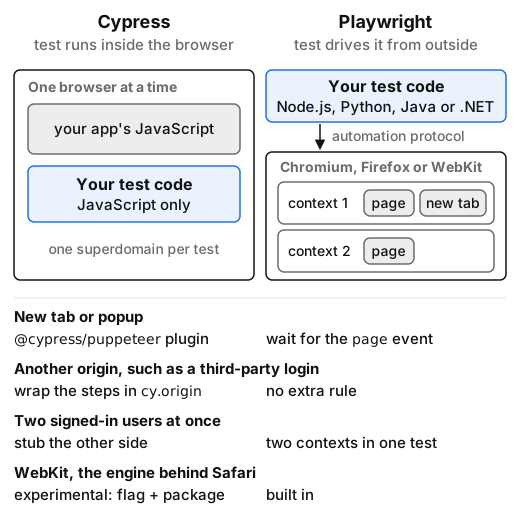 Where the test code sits (highlighted) decides the rest: inside the browser, Cypress gets direct access to your app but works in one browser; outside it, Playwright can drive several contexts, tabs and engines.
Debugging, components, and the API layer
Debugging. These two tools debug in genuinely different ways, and this is the section where taste matters most.
Cypress's interactive runner (cypress open) is its signature feature. You watch the test drive your app live, and then you hover over each command in the log to see the DOM as it was at that step. While you're writing tests, that tight loop feels great.
Playwright's answer is the trace viewer. It records a trace (actions, DOM snapshots, network and console) that you open after the run, including a run from CI. It also has a UI mode for local work. I didn't open either tool's interactive UI for this piece, so all of this comes from the docs. In short: Cypress is better while you're writing a test, and a Playwright trace is better when a CI run failed and you weren't watching it.
Component testing. This changed this year. Cypress has official component mounting for React, Angular, Vue and Svelte (Svelte is marked Alpha), using Vite or Webpack. It's mature, and it's the same runner you already know.
Playwright dropped its experimental @playwright/experimental-ct-* packages. In 1.62 it moved to a "stories and galleries" model: you write small story files next to your components, your own dev server renders them on a gallery page, and a mount fixture loads a story into a normal end-to-end test. The component testing docs call the new approach stable and say that if you're still on the old packages, you should stay on 1.62 until you migrate. It's a cleaner idea, but it means some setup work, and you own the gallery page.
Component tests in a real browser and Vitest tests are different layers. If a component is mostly logic, a Vitest unit test is faster and easier to read. Use browser component tests for the parts that really depend on layout, focus, or the browser itself.
The API layer. Both tools can make HTTP calls directly: Playwright through its request fixture, Cypress through cy.request. That's useful for seeding data or signing in before a UI test. Neither is a load-testing tool. If your actual question is "how many logins per second can the backend take", you want k6, not a browser.
CI, parallelism, and what the cloud costs
This is where the money is, so here are the details. Prices are from the Cypress pricing page on 2026-11-14.
Playwright in CI. The official GitHub Actions setup is four steps: npm ci, npx playwright install --with-deps, npx playwright test, then upload playwright-report/. Playwright runs test files in parallel on one machine by default. To spread a suite across machines, you pass --shard=1/4 through --shard=4/4 to separate jobs, then combine the results with npx playwright merge-reports, as described in the sharding docs. All of this is in the Apache-2.0 package. There's nothing to pay for and nothing to sign up for. The cost is that you run the CI matrix and cache the browser downloads yourself.
Cypress in CI. The cypress-io/github-action installs everything and can start your server with start: npm start. The binary is large: the Cypress 16.3.0 binary cache on my Linux run took 811 MB on disk. Plan to cache it.
Here's the catch. Cypress's parallelization docs say that "running tests in parallel requires the --record flag", which means sending results to Cypress Cloud. The open-source runner (MIT) runs your specs one after another on each machine. Splitting them across machines is a Cloud feature.
| Cypress Cloud plan | Price (2026-11-14) | Test results included | Users |
|---|---|---|---|
| Starter | Free | 500 per month | 10 |
| Team | From $67/month, billed annually ($799/year) | 120,000 per year | 50 |
| Business | From $267/month, billed annually ($3,199/year) | 120,000 per year | 50 |
| Enterprise | Custom | 1.8 million per year | Unlimited |
Parallelization and Test Replay are included on every plan, Starter included. Flake detection starts at Team. In the pricing FAQ, extra test results cost $6 per 1,000. A "test result" is one test in one run. That means a 200-test suite running on 20 pushes a day uses up the Starter allowance in its first afternoon. Do that multiplication with your own numbers before you commit.
Playwright has no paid tier of its own. Hosted browser grids for it exist from third parties, but they're outside the scope of this piece.
You can now set up either tool in CI, and you know which one charges for running in parallel.
Which one I'd pick, and for whom
For a new project, I'd pick Playwright. You get tabs, multiple users, cross-origin flows and real WebKit without workarounds. It parallelizes across machines without a paid account, and the trace viewer makes CI failures something you can actually investigate. Its weak spots are real, though: the first-run browser download is heavy, there's no hosted dashboard unless you build or buy one, and the new component-testing model makes you build the gallery page yourself.
Pick Cypress if your app lives on one origin and mostly in Chrome, your team writes tests in the interactive runner all day, or you already rely on Cypress component testing for React, Vue or Angular. The time-travel runner is still the friendliest way to write a test while you watch it run. Go in knowing three things: parallelism goes through Cypress Cloud, WebKit is still experimental, and the bundled Electron browser is on its way out.
If you already have a healthy Cypress suite, don't migrate just because of this article. Migrate when you hit one of the limits above: a tab, a second origin, a Safari bug, or a Cloud bill that grows faster than your team.
Here's how to decide. Write the login test from this piece against your own app's sign-in page in both tools. It took me five short files. Then add the one flow that worries you most, whether that's the OAuth redirect, the "open in new tab" link, or the Safari layout bug. Whichever tool handles that flow without a workaround is your answer.
About Sora Villanueva
Sora writes from a developer educator's point of view: a print designer who learned JavaScript to automate menu layouts, then inherited a flaky test suite and an abandoned docs site and fixed both. His pieces build the smallest working version, change one thing at a time and name the confusing part out loud. Away from the browser, he plays rhythm games competitively, collects risograph zines and writes the rules summaries for board-game night.