Claude Code vs Cursor: same tasks, different tools
If you want to hand a task to an agent and review a diff afterwards, pick Claude Code. If you want to stay inside an editor, where the AI predicts your next edit and you steer line by line, pick Cursor. Before choosing, read the pricing section: the plans Cursor now sells to new customers no longer include any allowance for Anthropic, OpenAI, or Google models, and that changes what $20–$30 a month buys.
A note on method before anything else. I did not run either tool for this piece. No installs, no timed runs, no benchmarks. What follows comes from the official docs, pricing pages, and changelogs, read on 14 November 2026, and each claim links to where it came from. I've written down the three tasks below so the hands-on version can be run exactly as stated and added as an update. Disclosure: SeekDeploy itself is built with Claude Code, as our tool listing says.
The three tasks, and how each tool approaches them
The task set, written so anyone can repeat it on a small Python or TypeScript repo with a test suite:
1. Fix a failing test:   "test_parse_dates fails on leap years. Fix the bug, not the test."
2. Feature across files: "Add a --json flag to the export command. Update the CLI, the
                          formatter, the docs, and add a test."
3. Explain unfamiliar code: "Explain how a request moves from the router to the database
                          in this repo. Name the files."
Task 1: fix a failing test. Claude Code's whole design suits this. You run claude in the repo, paste the instruction, and it reads files, runs the test command, edits, and reruns until the test passes, asking permission before commands unless you've loosened that. The docs describe exactly this loop: "paste an error message or describe the symptom. Claude Code traces the issue through your codebase, identifies the root cause, and implements a fix." Cursor's Agent does the same in the editor's side panel, with terminal execution as one of its tools. The difference is where you watch it. In Cursor you see the diff land in open files. In Claude Code you see a transcript, then review the diff in git or an IDE.
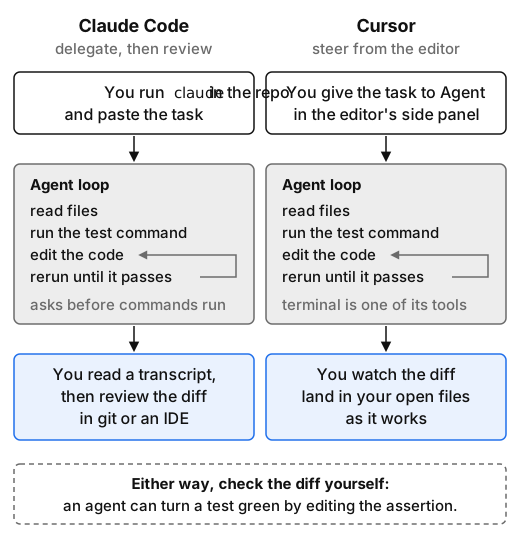 Task 1 as the docs describe it. The agent loop is the same in both tools. What differs is the last step, where you see the work (highlighted). Drawn from the vendors' docs, not from a test run.
My instruction says "fix the bug, not the test" for a reason. An agent that's rewarded for green tests can make them green by editing the assertion. Neither vendor's docs claim to prevent that. You have to check.
Task 2: a feature across four files. Both tools have a plan step for this: Shift+Tab into plan mode in Claude Code, and Plan mode (also Shift+Tab) in Cursor's editor and CLI. Cursor has an extra layer here, Tab completion, which "predicts cross-file edits when changes in one file need updates in another." So in Cursor you can take a middle path: write the flag yourself and let Tab propose the matching formatter and docs edits. Claude Code has no inline completion. You either delegate the whole change or you type it yourself.
Task 3: explain unfamiliar code. This is read-only work, and both tools search the repo on demand rather than relying on a pre-built cloud index. Cursor's docs say its Instant Grep index is built "on your machine" and that Cursor "does not upload file paths or code to build a search index." Claude Code reads files as it goes, and the /usage docs note that every one of those reads adds to the context you pay for. Cursor has a dedicated read-only Ask mode. In Claude Code you'd use plan mode or simply not approve edits.
My current thinking: Task 1 favours Claude Code slightly, Task 2 is a matter of taste, and Task 3 is a draw. I haven't tested any of this yet, and that's a hypothesis to check, not a result.
Interface and context: where each one lives
Claude Code is one engine with several front ends: a terminal CLI, VS Code and JetBrains extensions, a desktop app, and a web version at claude.ai/code. The overview says your CLAUDE.md, settings, and MCP servers "work across all of them." Project instructions go in CLAUDE.md (it reads AGENTS.md if that's what you have). It also runs headless with claude -p, so it fits in CI and shell pipelines.
Cursor is a VS Code fork with an agent built in. It also has a CLI (the command is agent, installed from cursor.com/install), cloud agents, and since October an Agent SDK. Instructions live in .cursor/rules/*.mdc files that can apply always, by file glob, or when the agent judges them relevant, and it reads AGENTS.md too.
So both tools now cover both surfaces. The real difference is the default. Cursor assumes you're in the editor and the agent is one panel among several. Claude Code assumes you've delegated, and the editor is optional.
Models differ too. Claude Code runs Anthropic's models. Cursor lists models from OpenAI, Anthropic, Google, and SpaceXSI, plus its own Composer. That choice is real, but on the new plans it now costs extra (see below).
Pricing as of 14 November 2026
Claude Code comes with a Claude subscription (claude.com/pricing, checked today):
| Plan | Price | Notes |
|---|---|---|
| Pro | $20/mo, or $17/mo billed annually | Includes Claude Code |
| Max | $100/mo | 5x Pro usage |
| Ultra | $200/mo | 10x Pro weekly usage, no 5-hour limit |
| Team | $25/seat standard, $125/seat premium (monthly) | $20 / $100 billed annually |
Usage is limited by a rolling five-hour window and a weekly cap. You can also pay per token through the API instead. Anthropic's cost docs give an enterprise average of "around $13 per developer per active day and $150-250 per developer per month." That's the vendor's own figure. Treat it as a planning number, not a quote.
Cursor changed shape this year. Cursor was acquired by SpaceX on 14 August 2026, and new customers now buy The X Subscription, one plan covering Grok, Cursor, and X (docs):
| Plan | Price | What you get for coding |
|---|---|---|
| Free | $0 | Limited Agent and Chat |
| Plus | $8/mo | Cursor's own models only (Grok 4.x, Composer 2.5), no third-party models |
| Premium | $30/mo | 4x Plus usage, cloud agents, Bugbot reviews |
| Super | $100/mo | 15x Plus |
| Ultra | $200/mo | 50x Plus |
| Teams | $30, $100 or $200/seat | Plus a $0.25/M token fee on eligible third-party models |
The detail that matters for this comparison: third-party models aren't included in any new plan. On Premium and above, Claude, GPT, and Gemini models are billed at API list price from prepaid credit. If you choose Cursor because you want to run Claude models in it, budget for the subscription plus metered usage. The included weekly pool covers Grok and Composer. The pricing page also bundles X perks (ad-free scrolling, a verification checkmark) that have nothing to do with coding.
If you were already on Cursor Pro ($20), Pro+ ($60), or Teams ($40/seat), the legacy plans page says those continue unchanged, including their included pool for third-party models. Switching to the new plans is "optional and permanent." Read that page before you click anything.
Privacy settings
Claude Code. On consumer plans (Pro, Max, Ultra), whether your sessions train future models is a setting you choose. Retention is five years if you allow training and 30 days if you don't (data usage docs). On Team, Enterprise, and the API, Anthropic doesn't train on your code, and the standard retention is 30 days. Zero data retention is available to qualifying Enterprise organisations. Telemetry can be turned off with DISABLE_TELEMETRY=1, or all non-essential traffic with CLAUDE_CODE_DISABLE_NONESSENTIAL_TRAFFIC=1. Local transcripts sit in plaintext under ~/.claude/projects/ for 30 days by default.
Cursor. With Privacy Mode on, Cursor says it doesn't train on your data and has zero-retention agreements with its model providers (data use). With it off, Cursor "may use and store codebase data, prompts, editor actions, code snippets." Privacy Mode is on by default for Enterprise teams. I couldn't find a stated default for individuals, so check your settings. Requests go through Cursor's backend even if you bring your own API key. .cursorignore blocks files from Agent, but the docs warn that terminal commands and MCP tools "may still be able to read ignored files."
Cursor's November incident. On 13 November, Cursor published a security incident update. An attacker used a key exposed by a partner to copy coding-agent traces for fewer than 0.05% of users not in Privacy Mode. Separately, for about 11 hours on 29 October, Cursor's extension marketplace cache served a malicious copy of Anthropic's Claude Code extension (versions 2.1.312 and 2.1.313). Cursor says Anthropic didn't publish that copy and it wasn't a flaw in Anthropic's product. If you run the Claude Code extension inside Cursor and updated on that date, follow Cursor's notice, which warns that uninstalling alone may not be enough. The practical lesson: turn on Privacy Mode.
What each is bad at
Claude Code:
- No inline completion. If most of your day is typing code, you'll want a second tool for that.
- Context costs money. Long sessions resend the whole conversation on every request. The cost docs spend a full section on "why usage climbs in a long session."
/clearbetween tasks isn't optional on a busy day. - One model family. If you want to compare GPT or Gemini on a task, you have to leave the tool.
- Delegation hides the work. A transcript plus a diff is less immediate than watching edits land in the file, and it's easier to approve something you skimmed.
Cursor:
- Plan complexity. Two generations of plans, a weekly pool shared with a chat app, prepaid credit for third-party models, and a per-token fee on Teams. Working out next month's bill takes reading.
- Third-party models cost extra on new plans. The flexibility is still there, but it's no longer included.
- You depend on a fork. Cursor decides when it picks up upstream VS Code changes.
- Ownership change. Cursor is now part of a company whose subscription also sells social-media perks. The acquisition post says nothing about privacy or how Cursor's product will be run. That isn't a defect, but it's a reason to re-read the terms you signed up under.
How to decide
Start from how you want to work, not from benchmarks. If you'd rather write a clear task, walk away, and review a diff, Claude Code is built around that, and Pro at $20 includes it with no metered model costs on top. If you'd rather keep your hands on the keyboard with an editor that guesses your next edit, Cursor's Tab is the feature Claude Code doesn't have. Price it as Premium at $30 plus API usage if you want Claude or GPT models, or keep your legacy plan if you have one. Plenty of people run both: Cursor as the editor, a terminal agent in the side pane. Either way, run the three tasks above on your own repo for a week before committing a team. For the wider field, including GitHub Copilot and Aider, see our guide to choosing an AI coding assistant and the AI coding category.
About Idris Okonjo
Idris writes from a data journalist's point of view: council records and election-night dashboards, then backend work in civic tech and six years running an API platform team. His pieces show the exact prompt or request, the version it ran against, and a clear line between what was observed and what is suspected. Away from the terminal, he birdwatches along the Tagus, logs every sighting in SQLite, and digitises old transit maps.